How Long Should a Blog Post, Essay or Caption Be? A Word Count Guide

In this guide
- The honest answer: as long as it needs to be, and no longer
- Typical lengths that work
- How reading and speaking time are worked out
- Counting your words
- Hitting a limit without ruining your writing
- Splitting long text to fit a limit
- Length and readability
- A worked example: a personal statement with a 650-word limit
- Word counts in different languages
- A quick editing checklist
- Frequently asked questions
- In short
"Write 1,500 words." "Captions are limited to 2,200 characters." "Your statement must not exceed 500 words." "The speech should be about five minutes." Almost everything we write today comes with a number attached, and it is rarely clear whether that number is a target, a limit or a rough suggestion.
Then there is the question every new blogger asks: how long should my post be? You will find confident answers online ranging from 300 words to 3,000, often with charts that seem to prove each one. The honest answer is more useful than any single number, and this guide explains it, together with practical word counts for the things people write most often and a simple method for hitting a limit without padding or butchering your writing.
The honest answer: as long as it needs to be, and no longer
Length is a result, not a goal. A piece of writing is the right length when it fully answers the reader's question and stops.
- A post answering "How do I rotate a PDF on my phone?" might be complete in 600 words. Stretching it to 2,000 words with history and filler makes it worse.
- A guide comparing five ways to compress files, with examples, mistakes to avoid and answers to follow-up questions, may genuinely need 2,000 words or more. Cutting it to 600 leaves readers with unanswered questions.
Search engines have said for years that they do not rank pages by word count. What they reward is content that satisfies the person searching. Long articles often rank well not because they are long, but because thorough answers tend to be long. Padding a short answer to look thorough has the opposite effect: readers leave quickly, and they do not come back.
A useful test: read each paragraph and ask, "Would the reader miss this if I deleted it?" If the answer is no, delete it.
Typical lengths that work
These ranges are starting points drawn from common practice, not rules. Your audience, your topic and any instructions you have been given always come first.
Online writing
| Type | Typical length |
|---|---|
| Quick answer or news update | 300–700 words |
| Standard blog post | 900–1,500 words |
| In-depth guide or tutorial | 1,800–3,000 words |
| Product description | 150–400 words |
| About page | 300–800 words |
| Email newsletter | 200–600 words |
Study and work
| Type | Typical length |
|---|---|
| School essay | As set by the teacher, often 500–1,500 words |
| University assignment | As set, commonly 1,500–3,000 words |
| Cover letter | 250–400 words, never more than one page |
| Personal statement | Often limited to 500–650 words or a set number of characters |
| Executive summary | About 10% of the report, often under one page |
| Professional email | Under 200 words when possible |
Social media and messages
Platforms set their own limits and change them from time to time, so check the current rules. Commonly cited limits include about 280 characters for a standard post on X, about 2,200 characters for an Instagram caption and about 5,000 characters for a YouTube description. Remember that only the first line or two of a caption is shown before "more", so the first sentence must carry the message.
Titles and descriptions for search
- Page titles: search results usually show around 50–60 characters before cutting a title off.
- Meta descriptions: around 150–160 characters are typically shown.
Put the important words first in both.
How reading and speaking time are worked out
Word counts become more meaningful when you think in time:
- Reading time is based on an average adult reading speed of about 200–250 words per minute for ordinary text. A 1,500-word blog post takes about six to seven minutes to read.
- Speaking time is slower, about 130 words per minute for a clear speech or voice-over. A five-minute speech is roughly 650 words, and a one-minute video script is about 130 words.
These are averages. Technical text is read more slowly; a lively speaker talks faster. But they are reliable enough for planning a talk, a video script or the reading time shown at the top of an article.
Counting your words
Word Counter updates the counts as you type or paste, in your browser:
- Type, paste, or open a
.txtfile. - Read the Words, Characters, Characters (no spaces), Sentences, Paragraphs and Lines counts.
- See the Reading time and Speaking time straight away.
- Optionally enter a Character limit or Word limit to see how many you have left or how many to cut.
- Check Most used words to spot repetition.
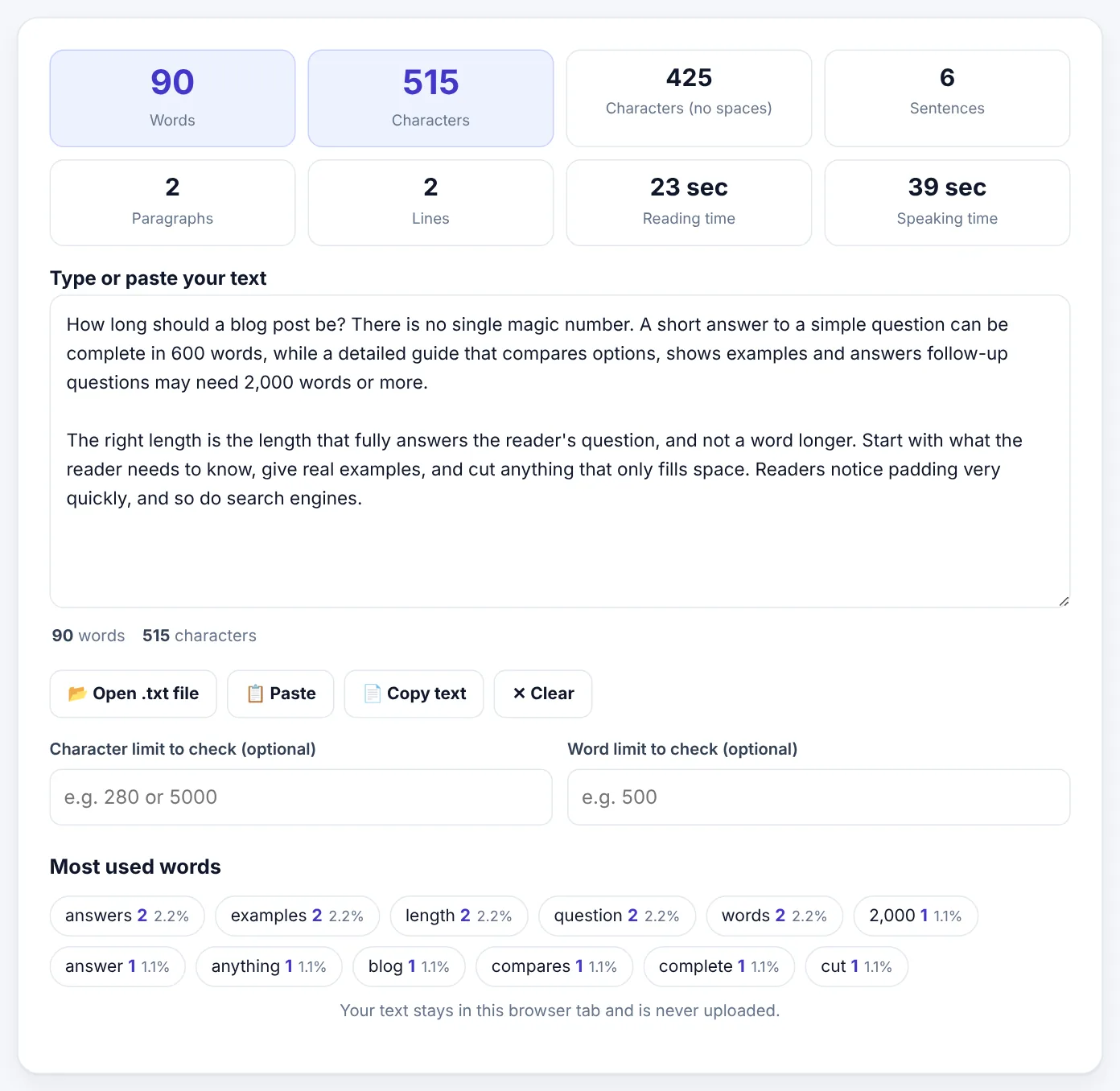
Your text stays in your browser and is never uploaded, which matters for personal statements, unpublished articles and work documents.
Characters with or without spaces?
Most apps count spaces and line breaks as characters, and the main Characters count does the same. Some forms, especially for applications and translation quotes, ask for characters without spaces; that is the Characters (no spaces) box. If an instruction just says "characters", it usually means with spaces.
How words are counted
Anything separated by a space or a new line counts as one word. That means the count works for English, Urdu, Hindi, Arabic and most other languages that separate words with spaces. Different programs can disagree by a few words on things such as hyphenated words, numbers and dashes, so treat small differences between apps as normal.
Try Word CounterFree, no sign-up, and your file never leaves your device.Open tool →

Hitting a limit without ruining your writing
When you are over the limit
Cutting is where most writing gets better. Work from big cuts to small ones:
- Remove whole sections that do not serve the main point. This is painful but saves the most words.
- Cut throat-clearing openings. "In today's fast-paced world, it is more important than ever to…" can almost always go.
- Remove repetition. If you said something in the introduction and again in the conclusion, keep the clearer version. The Most used words list helps you spot repeated words.
- Shorten wordy phrases. "Due to the fact that" becomes "because"; "in order to" becomes "to"; "at this point in time" becomes "now".
- Delete weak intensifiers: very, really, quite, extremely, basically.
- Prefer active sentences. "The report was written by the team" (7 words) becomes "The team wrote the report" (5 words).
For long documents, an AI summary can show you what the core message is. AI Summarizer produces a shorter version you can compare with your own, but always rewrite in your own words and check that nothing important has been lost.
When you are under the limit
Never pad. Instead, ask what your reader still needs:
- An example. Concrete examples make abstract points clear and naturally add length.
- A common mistake and how to avoid it.
- An answer to the obvious next question.
- Evidence: a figure, a source, a short case study.
- A comparison with an alternative.
If you genuinely have nothing more to add, your piece is probably complete. For school and university assignments, check whether the stated length is a target with a tolerance (often plus or minus 10%) or a strict maximum.
Splitting long text to fit a limit
Sometimes the problem is not your writing but the box it must fit into: a long message that must go as several WhatsApp or SMS messages, a thread of posts, a script for a voice-over tool with a character limit, or text for an AI tool that accepts only so much at once.
Text Splitter divides long text into parts that each fit a limit, in characters or words:
- Paste your text.
- Set the Maximum length of each part, or tap a quick button such as 280 · X or 2,200 · Instagram.
- Choose where each part should End: at a full stop, a line, a word, or at the exact length.
- Optionally add a Part number such as 1/3, 2/3 at the start or end.
- Press Split text and copy each part with its own button.
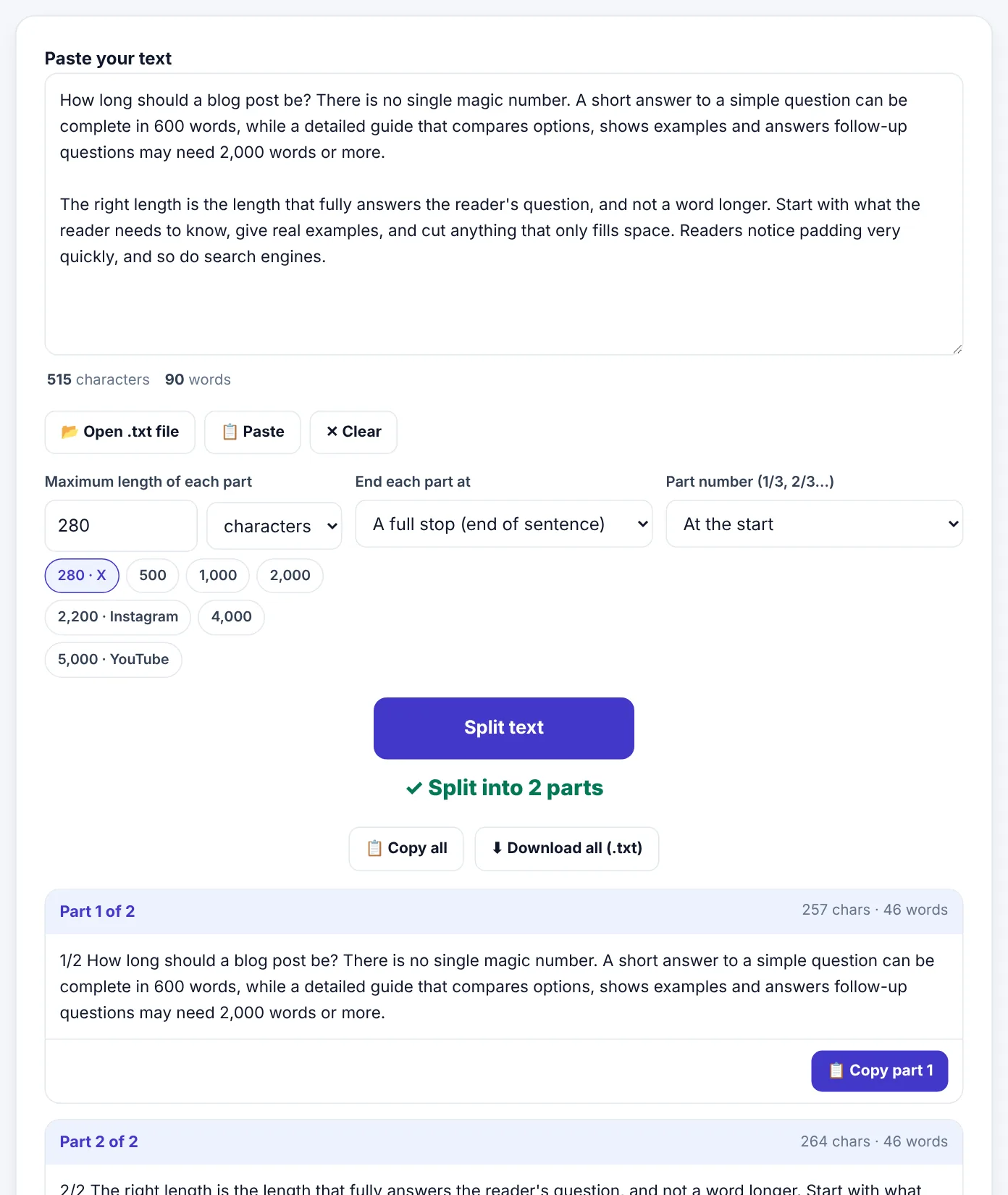
Ending parts at a full stop means no sentence is cut in half, which makes a thread or a series of messages far easier to read.
Length and readability
Word count is only one side of length. How long your text feels depends just as much on how it is written:
- Short paragraphs, of two to four sentences, are much easier to read on phones.
- Headings let readers jump to the part they need, which makes a 2,000-word guide feel manageable.
- Lists and tables compress information that would take several paragraphs to explain.
- Varied sentence length keeps text lively; a page of identical long sentences is tiring.
- A clear first paragraph that tells readers what they will get keeps them reading.
A well-structured 2,000-word guide is often easier to read than a badly structured 800-word post.
A worked example: a personal statement with a 650-word limit
Usman writes a first draft of his university personal statement. Word Counter shows 912 words, 262 over the limit.
- He removes a paragraph that repeats his grades, which already appear in his application: minus 110 words.
- He cuts his opening, a general sentence about "a passion for technology since childhood": minus 35 words.
- He shortens wordy phrases throughout, guided by a short list he keeps: minus 60 words.
- He checks Most used words and finds he used "passionate" six times; he keeps one: minus 15 words.
- He tightens three long sentences into active voice: minus 40 words.
The statement is now 652 words. One final pass removes a few more, and he finishes at 638 words, with a statement that his teacher says is clearer and more convincing than the long version.
Word counts in different languages
Word counts do not translate one-to-one. The same message can be noticeably longer or shorter in another language:
- Urdu and Hindi translations of English text are often longer in words, because grammar words such as ka, ki, ko and hai are written separately.
- German often uses fewer, longer words, because it joins words together.
- Chinese and Japanese do not separate words with spaces, so limits for them are usually given in characters rather than words.
If you write in one language and translate into another, check the limit again after translating, and expect to edit. Character limits on social platforms apply to the final text, whatever the language.
A quick editing checklist
Before you submit or publish anything with a length requirement:
- [ ] Within the limit, checked in the same way the receiver counts (words or characters, with or without spaces).
- [ ] The first sentence states the main point.
- [ ] No paragraph that the reader would not miss.
- [ ] No word repeated so often that it stands out.
- [ ] Headings, lists or short paragraphs where they help reading.
Frequently asked questions
Is longer content better for SEO?
Not in itself. Search engines reward content that answers the searcher's question well. Thorough answers are often long, but adding words without adding value does not help.
How many words is a five-minute speech?
About 650 words, based on a speaking speed of roughly 130 words per minute.
How many pages is 1,000 words?
Roughly two pages single-spaced or four pages double-spaced at a 12-point font, depending on the font, margins and spacing.
Does Word Counter work with Urdu?
Yes. Words are counted by spaces and new lines, and the Urdu full stop (۔) is recognised as a sentence ending.
Is my text saved or uploaded?
No. Counting and splitting happen in your browser, and your text is never sent to us.
In short
There is no magic word count. Write until the reader's question is fully answered, then stop. Use typical ranges as a starting point, think in reading and speaking time, cut wordy phrases before cutting ideas, add examples instead of padding, and split long text into tidy parts when a box or platform has a limit.
Tools used in this guide
 Text Splitter
 AI Summarizer
 Markdown to PDF
Keep reading
 Ebooks & WritingHow to Use Mind Maps for Studying (With Examples)
Why mind maps help you understand and remember, how to build a good one from a chapter or lecture, and how to revise with them. Includes subject examples and a step-by-step study routine.
9 min read Ebooks & WritingHow to Format an E-book and Paperback for Amazon KDP
A practical guide for first-time self-publishers - manuscript files, trim sizes, margins, page numbers, covers and the checks that stop Amazon KDP rejecting your book.
10 min read Ebooks & Writing"EPUB vs PDF: Which E-book Format Should You Use?"
The real differences between EPUB and PDF for e-books, study material and self-published books, which one readers prefer on phones and e-readers, and how to convert between them.
10 min read