How to Use Mind Maps for Studying (With Examples)
In this guide
- What is a mind map?
- Why mind maps help you learn
- How to make a good study mind map
- Making a mind map on your device
- A study routine with mind maps
- Examples by subject
- Using mind maps for writing and projects
- Common mistakes
- Mind maps for different ages and levels
- Paper or digital?
- Frequently asked questions
- In short
You have read the chapter twice. You highlighted half of it in yellow. The exam is next week, and when you close the book and try to explain the topic, you find you remember a few scattered facts but not how they fit together.
This is one of the most common experiences in studying, and it has little to do with intelligence or effort. Reading and highlighting feel productive, but they are mostly passive. A mind map forces you to do the active part: decide what the main ideas are, how they connect, and what sits under what. This guide explains why mind maps work, how to make a good one, and how to use it to revise, with examples from different subjects.
What is a mind map?
A mind map is a diagram that puts one main topic in the centre and arranges related ideas around it as branches. Each branch splits into smaller branches for details. Instead of a page of sentences, you get a picture of how a topic is organised.
A mind map for photosynthesis might have the topic in the middle and branches for inputs (sunlight, water, carbon dioxide), where it happens (chloroplasts, chlorophyll), two stages (light reactions, Calvin cycle), outputs (glucose, oxygen) and exam tips. One glance shows the whole topic.
Why mind maps help you learn
Mind maps are not magic, but they support several things that research on learning consistently finds helpful:
- They make you process, not copy. To build a map you must decide what matters and how ideas relate. That act of organising is itself learning.
- They show structure. Many topics are hierarchies or networks. Seeing the shape of a topic makes it easier to understand and to remember.
- They are compact. A whole chapter on one page is easier to review regularly than twenty pages of notes.
- They combine words and visuals. Colours, positions and icons give your memory extra cues. Many students remember "the red branch on the top right" before they remember the words on it.
- They are perfect for self-testing. Cover a branch and try to recall it. Retrieval practice, actively pulling information from memory, is one of the most effective study techniques there is.
Mind maps work best for topics with clear structure: biology, history, geography, literature themes, business concepts, chapters of almost any textbook. For step-by-step procedures, such as maths methods, a worked example or a flowchart is often better.
How to make a good study mind map
1. Start with one clear central topic
Use a specific topic, not a whole subject. "Causes of World War I" works; "History" does not. A good central topic is something you could be asked to explain in an exam answer.
2. Choose 4–7 main branches
Main branches are the big ideas: the headings of the chapter, the key causes, the main stages. Fewer than four usually means the topic is too narrow; more than seven becomes crowded. If you have more, group related ones.
3. Use keywords, not sentences
Each branch should hold one to four words. "Light reactions" rather than "The light-dependent reactions take place in the thylakoid membranes." Keywords force you to compress ideas, and the detail stays in your head (and in your book) rather than on the map.
4. Go one or two levels deeper
Under each main branch, add the supporting facts, examples, dates or definitions. Two or three levels are usually enough for a study map; deeper than that, make a separate map for the sub-topic.
5. Use colour and icons with meaning
Give each main branch its own colour so it is easy to find. Add an icon or a short note to ideas that are especially important or that you keep forgetting.
6. Add links and exam tips
A branch for "exam tips" or "common mistakes" is one of the most useful things on a revision map. So is noting connections between branches, such as a cause that leads to a later effect.
Making a mind map on your device
You can draw mind maps on paper, and many students love doing so. A digital mind map is easier to change, rearrange, share and print neatly. Mind Map Maker offers three ways to start:
- From text or file: paste your notes, an article or a chapter, or open a PDF, Word or TXT file, and an AI creates a first map of the main ideas.
- From a topic: type a topic, such as "Digital marketing plan", and get a starting map to build on.
- Write it myself: type an outline, one idea per line, indenting sub-ideas with spaces. The first line becomes the centre. No AI is used.
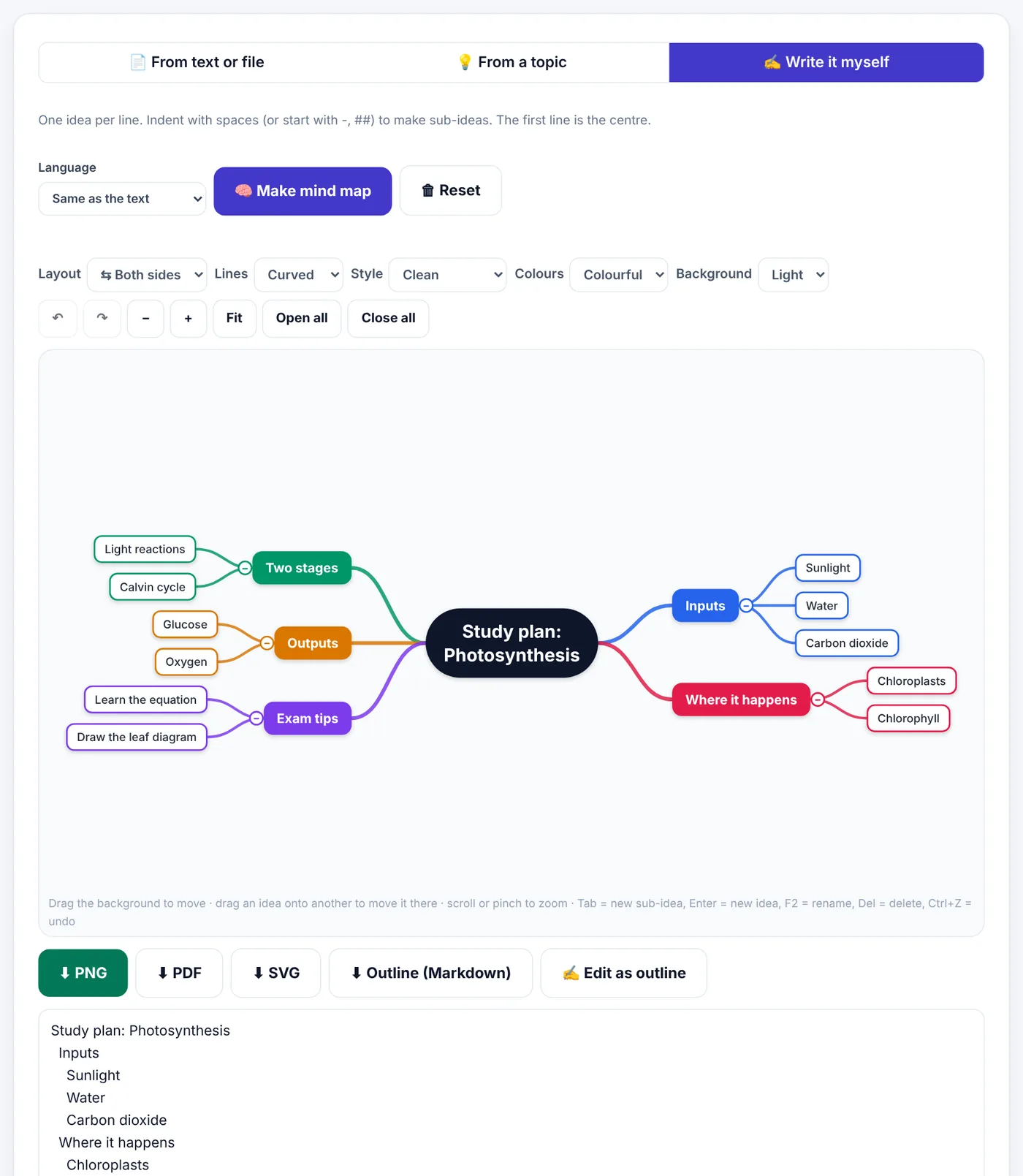
Then make it your own:
- Click an idea to add a sub-idea, add an idea at the same level, rename it, change its colour, add an icon or a note, or ✨ grow it with AI.
- Drag an idea onto another to move it to a different branch.
- Change the look with Layout (both sides, right, tree, org chart or timeline), Lines (curved, straight or elbow), Style (clean, hand-drawn or outline), Colours (colourful, pastel or grey) and a light or dark Background.
- Use keyboard shortcuts: Tab adds a sub-idea, Enter adds an idea at the same level, F2 renames, Delete removes, Ctrl+Z undoes.
- Download as PNG, PDF, SVG or a Markdown outline.
Try Mind Map MakerFree, no sign-up, and your file never leaves your device.Open tool →

A word on AI-made maps
An AI-generated map is a starting point, not your study. If the AI does the organising, you skip the part that makes mind maps work. Use AI maps to get an overview of a long chapter quickly, then rebuild, rename, rearrange and add to the map yourself. Even better, try building the map first from memory, and only then compare it with an AI map to see what you missed.
For privacy: when you use the AI options, your text is sent to an AI service to create the map. Write it myself works entirely in your browser.
A study routine with mind maps
Here is a simple routine that combines mind maps with techniques known to help memory:
- Read actively. Read a section of your chapter or lecture notes once, without highlighting everything.
- Close the book and map from memory. Write the central topic and every branch you can recall. This is retrieval practice.
- Open the book and fill the gaps in a different colour. The gaps show you exactly what you do not know yet.
- Tidy the map. Rearrange branches so the structure makes sense to you.
- Review after one day, then after three days, then after a week. Each time, cover the map first and try to redraw the main branches. Spacing reviews like this is far more effective than one long session.
- Before the exam, use the map to practise explaining the topic aloud, branch by branch, as if teaching a friend.
Examples by subject
Biology: the human heart
Centre: The heart. Branches: structure (four chambers, valves, septum), blood flow (body → right atrium → right ventricle → lungs → left atrium → left ventricle → body), heartbeat (pacemaker, electrical signals), diseases, exam diagram tips. The Tree or Right layout works well for the flow branch.
History: causes of a war or revolution
Centre: the event. Branches for long-term causes, short-term causes, trigger, key people and consequences. Use the Timeline layout for a separate map of events in order.
Literature: a novel
Centre: the title. Branches for characters, themes, setting, key quotations and structure. Under each theme, add the chapters and quotations that show it, which makes essay planning much easier.
Business: a marketing plan
Centre: the product. Branches for target audience, channels, budget, timeline and measurement. The Org chart layout is handy for plans with clear levels.
Languages: vocabulary by theme
Centre: a theme such as food or travel. Branches for categories, with words and example phrases underneath. Grouping vocabulary by meaning helps you recall it in conversation.
Using mind maps for writing and projects
Mind maps are not only for revision:
- Planning essays: put the question in the centre, arguments as branches, and evidence underneath. Download the outline as Markdown and turn it into your essay plan.
- Planning presentations: each main branch becomes a slide.
- Group projects: map the tasks and who does what, then share the PDF.
- Note-taking in lectures: start with the lecture title in the centre and add branches as the lecturer moves between topics.
Common mistakes
- Too much text. Sentences on every branch turn a map back into notes. Keep it to keywords.
- Too many main branches. More than seven becomes hard to read. Group them.
- Making it beautiful instead of useful. Colours and icons should help memory, not take hours.
- Making the map and never looking at it again. The map's value comes from repeated review and self-testing.
- Letting AI do all the thinking. Use AI to start or check, not to replace your own organising.
Mind maps for different ages and levels
School students benefit from simple maps with pictures and colours: one topic, a few branches, short words. Drawing them by hand can be part of the fun, and a printed digital map makes a neat revision poster.
University students use maps to connect readings, lectures and arguments. A map per lecture, plus one overview map per module, makes exam revision far more manageable.
Professionals studying for certifications often face huge syllabuses. A map of the syllabus with a branch per domain, and a separate detailed map per domain, shows progress and highlights weak areas.
Teachers use mind maps to introduce a topic, check what a class already knows, or summarise a unit. A map projected at the start of a lesson gives students the big picture before the details.
Paper or digital?
Both work. Choose what suits you:
| Paper mind maps | Digital mind maps |
|---|---|
| Drawing by hand can help memory | Easy to change, rearrange and correct |
| No device distractions | Neat, readable and easy to share |
| Limited by the size of the page | Can grow as large as needed |
| Hard to edit after mistakes | Undo, redo, fold and unfold branches |
| Easy to annotate during lectures | Downloads as PNG, PDF, SVG or an outline |
Many students draw a quick paper map during a lecture, then make a tidy digital version while reviewing that evening. Rebuilding the map is itself a second round of active learning.
Frequently asked questions
Are mind maps better than notes?
They are different. Notes capture detail; mind maps show structure and are excellent for review. Many students use both: detailed notes while learning, a mind map for revision.
How long should it take to make a mind map?
A chapter map usually takes 15–30 minutes. If it takes much longer, you are probably adding too much detail.
Can I make mind maps in Urdu?
Yes. Mind Map Maker works with Urdu; choose Urdu as the language or leave it as the same language as your text.
How long can my text be for an AI map?
Up to about 15,000 words. Long documents are summarised into the main ideas.
Can I print my mind map?
Yes. Download it as PDF or PNG and print it. A4 landscape usually suits a wide map.
Is Mind Map Maker free?
Yes, with no watermark. You only need a free account (your name and e-mail, confirmed with a short code).
Can I turn my mind map back into notes?
Yes. Download the outline as Markdown, or use Edit as outline to see the map as an indented list, which you can copy into your notes or turn into an essay plan.
In short
A good study mind map has one clear topic in the centre, four to seven main branches, keywords instead of sentences, and colours with meaning. Build it from memory first, fill the gaps from your book, and review it a few times over the following days by covering branches and recalling them. Use AI to get started on long chapters, but do the organising yourself: that is where the learning happens.
Tools used in this guide
 AI Summarizer
 PDF to Text
 Markdown to PDF
Keep reading
 Ebooks & WritingHow Long Should a Blog Post, Essay or Caption Be? A Word Count Guide
Sensible word counts for blog posts, essays, cover letters, captions and speeches, how reading and speaking time are worked out, and how to hit a limit without padding or cutting meaning.
9 min read Ebooks & WritingHow to Format an E-book and Paperback for Amazon KDP
A practical guide for first-time self-publishers - manuscript files, trim sizes, margins, page numbers, covers and the checks that stop Amazon KDP rejecting your book.
10 min read Ebooks & Writing"EPUB vs PDF: Which E-book Format Should You Use?"
The real differences between EPUB and PDF for e-books, study material and self-published books, which one readers prefer on phones and e-readers, and how to convert between them.
10 min read