How to Make an ATS-Friendly Resume That Recruiters Actually Read
In this guide
- What is an ATS?
- Rule 1: Make it easy to read for software
- Rule 2: Use the words from the job description
- Rule 3: Write for the human who reads it next
- How to build an ATS-friendly resume for free
- Photos, personal details and local customs
- PDF or Word?
- Testing your resume like an ATS would
- Common resume mistakes
- Pair it with a cover letter
- Writing strong bullet points: a simple formula
- Resumes for fresh graduates
- Keeping your resume up to date
- Frequently asked questions
- In short
You apply for a job that fits you well, and never hear back. Not even a rejection. One common reason has nothing to do with your experience: the company's software could not read your CV properly, or did not find the words it was looking for, and it never reached a person.
Most medium and large employers, and many recruitment agencies, use an applicant tracking system (ATS) to collect, sort and search applications. Writing a resume that works well with these systems is not about tricks. It is about clear structure, readable formatting and relevant words. This guide explains how ATS software reads your resume and how to build one that passes the software and impresses the human who reads it next.
What is an ATS?
An applicant tracking system is software that manages job applications. When you apply online, your resume usually goes into an ATS first. It typically:
- Reads (parses) your resume, extracting your name, contact details, job titles, employers, dates, education and skills into a database.
- Lets recruiters search that database with keywords, such as "Excel", "customer service" or "AutoCAD".
- Ranks or filters applications based on how well they match the job description and any screening questions.
- Shows recruiters a summary, often with your resume attached.
Common systems include Workday, Greenhouse, Lever, iCIMS, Taleo, BambooHR and many others. Local job portals have their own versions.
An ATS does not "reject" people on its own in most companies. But if it cannot read your resume, or your resume does not contain the words recruiters search for, you may simply never show up in their searches.
Rule 1: Make it easy to read for software
ATS parsers are much better than they used to be, but they still stumble on certain layouts. Keep the structure simple:
- Use real text, not an image of text. A resume designed in an image editor and saved as a picture, or a scanned printed resume, has no readable words at all.
- Use standard section headings: Profile or Summary, Work Experience, Education, Skills, Certificates, Languages. Creative headings like "My Journey" or "What I Bring" can confuse parsers.
- Avoid putting key information in headers and footers. Some parsers skip them. Your name and contact details belong in the main body.
- Be careful with tables and text boxes. Simple two-column layouts are usually fine today, but complex tables, nested text boxes and text placed over shapes can be read in the wrong order.
- Use common fonts such as Inter, Arial, Calibri, Lato or similar. Unusual decorative fonts may not extract correctly.
- Write dates consistently, for example
Mar 2022 – Presentor03/2022 – Present. - Spell out job titles clearly: "Senior Graphic Designer", not just "Senior".
Rule 2: Use the words from the job description
Recruiters search for skills and job titles that appear in the job advert. If the advert asks for "social media marketing", "Canva" and "content calendar", and your resume says "managed online presence using design tools", a keyword search will not find you, even if you did exactly that work.
How to do it honestly:
- Read the job description and list the skills, tools, qualifications and duties it mentions.
- Mark the ones you genuinely have.
- Use the same words in your profile, skills list and experience bullet points.
- Include both the full term and the abbreviation where common: "Search Engine Optimisation (SEO)".
- Do not stuff keywords or add skills you do not have. Recruiters read the resume afterwards, and interviews test what you claim.
Tip: Tailor your resume for each important application. Keep a master version with everything, then make a copy and adjust the profile and skills to match each job. It takes ten minutes and makes a real difference.
Rule 3: Write for the human who reads it next
Once you pass the software, a recruiter spends, on average, well under a minute on a first read. Make that time count:
- Start with a short profile: two or three lines saying who you are, your main strength and what you are looking for.
- Lead each job with achievements, not duties. "Increased online sales by 30% in six months" beats "Responsible for online sales".
- Use numbers: projects, clients, team size, money saved, percentages.
- Keep bullet points short: one line where possible, two at most.
- Put the most relevant information first. Fresh graduates should put education and projects before experience; experienced professionals the other way round.
- Keep it to one or two pages. One page is ideal for early career, two for experienced candidates.
How to build an ATS-friendly resume for free
Resume Builder creates resumes with real, selectable text, standard section names and clean layouts that parsers read well. It runs in your browser; your details are not uploaded.
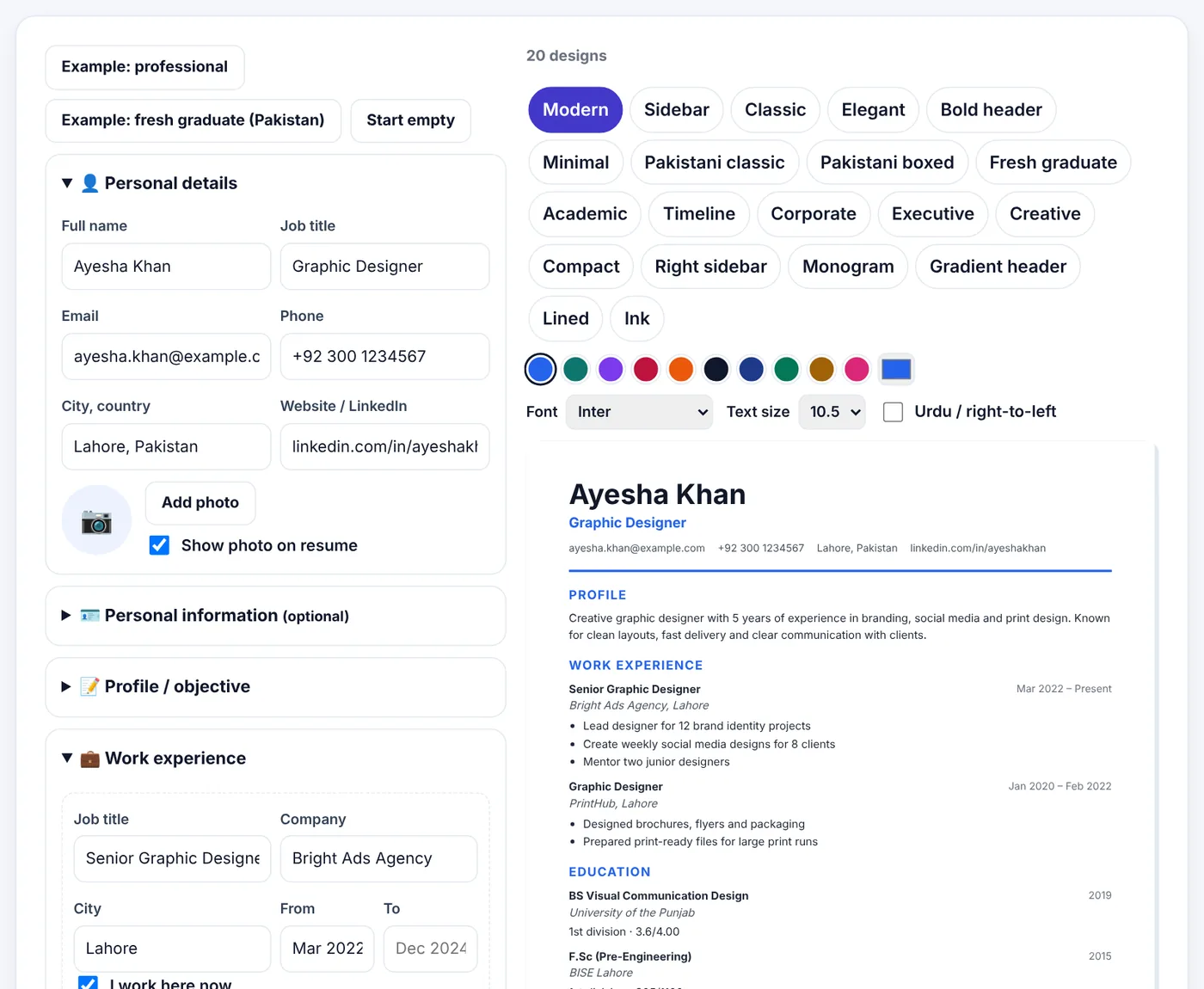
- Open Resume Builder. Start from an example (professional or fresh graduate) or Start empty.
- Fill in Personal details: name, job title, email, phone, city and a website or LinkedIn profile. Add a photo only if it is normal in the country you apply to (see below).
- Write your Profile / objective in two or three lines.
- Add Work experience: job title, company, city, dates and achievement-focused bullet points.
- Add Education, Skills (separated by commas), Languages, and optional Certificates / Projects / Awards, Hobbies and References.
- Choose one of the designs, a colour, a font and the text size. The preview updates as you type.
- Download as PDF (best for applying) or Word (if a recruiter asks for an editable file).
Choosing a design
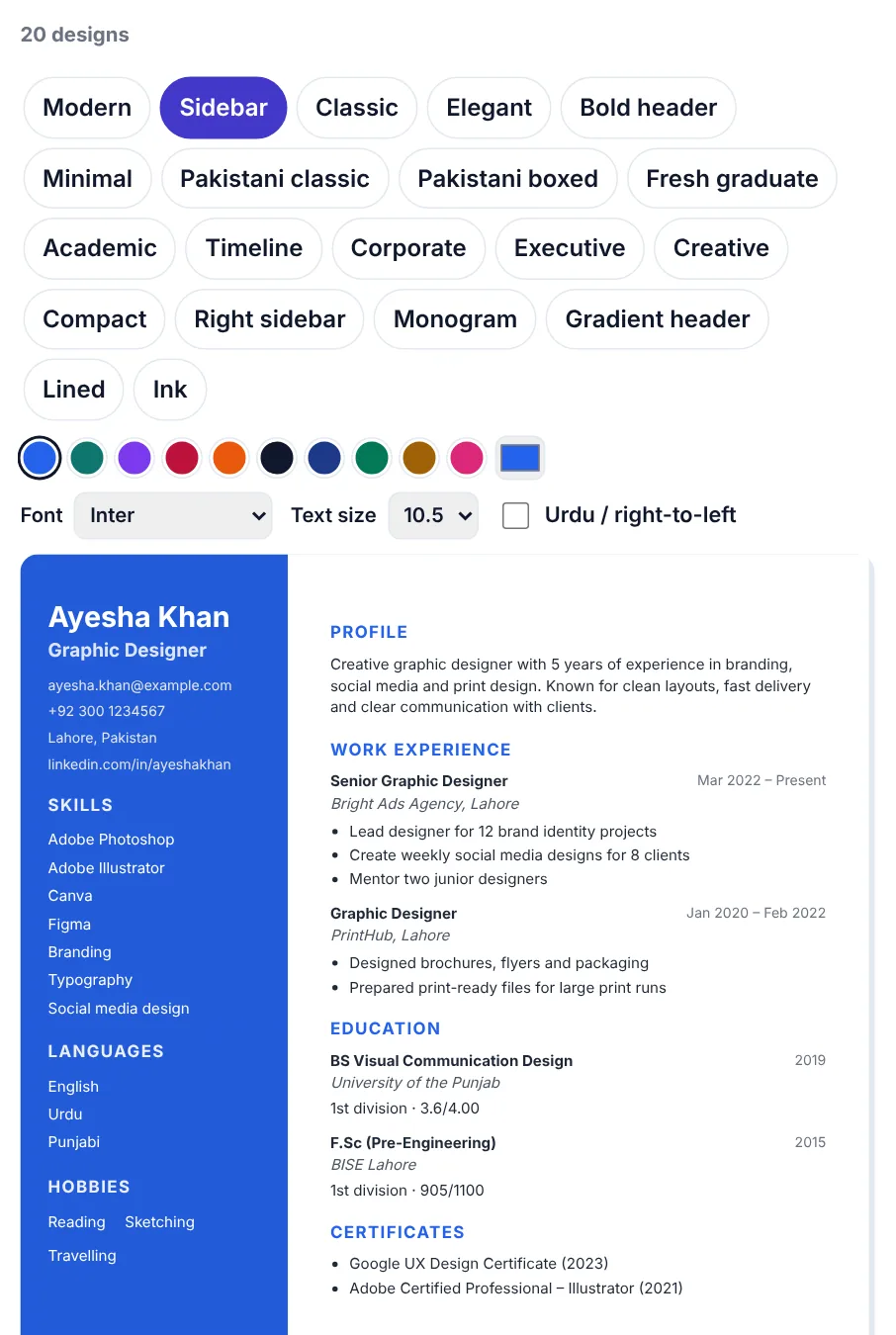
The designs range from simple single-column layouts to sidebar and header styles. For ATS-heavy applications, such as large companies and online portals, choose a cleaner design: Modern, Classic, Minimal, Compact or Corporate. For applications sent directly to a person, such as small businesses, creative roles or referrals, a more visual design like Sidebar, Creative or Gradient header can help you stand out.
Photos, personal details and local customs
What belongs on a resume depends on the country:
- United States, United Kingdom, Canada, Australia: usually no photo, no date of birth, no marital status. Employers avoid them to prevent discrimination.
- Pakistan, India, the Middle East and parts of Europe and Asia: photos and some personal information (such as date of birth, nationality or marital status) are still common and sometimes expected.
Resume Builder lets you show or hide the photo and keeps extra details in an optional Personal information section, so you can adjust one resume for different markets. There are also designs such as Pakistani classic and Pakistani boxed that follow layouts familiar to local employers.
PDF or Word?
- PDF keeps your design exactly as you made it, on every device. Most online application systems handle PDF resumes well. Use PDF unless told otherwise.
- Word (.docx) is sometimes requested by recruiters and agencies who want to edit or reformat your resume. Some older ATS systems also parse Word files slightly more reliably.
Resume Builder gives you both. Name the file professionally: Ayesha-Khan-Resume.pdf, not CV final final 2.pdf.
Try Resume BuilderFree, no sign-up, and your file never leaves your device.Open tool →

Testing your resume like an ATS would
Before sending, do a quick test:
- Open your PDF and select all the text (Ctrl+A), copy it and paste it into a plain text editor such as Notepad.
- Read the pasted text. Is your name at the top? Are sections in a sensible order? Are job titles, companies and dates together?
- Search for key skills from the job advert. Are they there?
- Check for strange characters or missing words.
If the plain text reads clearly, an ATS will almost certainly read it well too. If you only have an old resume as a PDF, you can make it editable with PDF to Word and rebuild it.
Common resume mistakes
- Spelling mistakes, especially in your own email address or phone number.
- An unprofessional email address. Create a simple one with your name.
- Long paragraphs instead of bullet points.
- Listing every duty instead of results.
- Outdated information such as school-level details for experienced candidates.
- Inconsistent formatting: different date styles, fonts or bullet shapes.
- Huge file size because of a large photo. Keep the resume under 1 MB; compress if needed with Compress PDF.
Pair it with a cover letter
Many applications ask for a cover letter, and even when optional, a short, specific one helps. Cover Letter Builder can reuse the details from your resume and offers matching designs. See our guide on how to write a cover letter.
Writing strong bullet points: a simple formula
Most resumes describe duties: "Responsible for social media posts." Strong resumes describe results. A reliable formula is:
Action verb + what you did + result (with a number if possible)
| Weak | Strong |
|---|---|
| Responsible for social media | Planned and designed 20 posts a month for 8 clients, growing average engagement by 35% |
| Handled customer complaints | Resolved 30+ customer issues a week, keeping satisfaction above 90% |
| Worked on the company website | Redesigned the product pages, cutting load time in half and increasing enquiries by 20% |
| Did data entry | Entered and checked 500 records a day with a 99.8% accuracy rate |
| Helped organise events | Coordinated logistics for 3 university events with 400+ attendees each |
Useful action verbs: led, built, designed, improved, reduced, increased, launched, organised, trained, negotiated, analysed, delivered, automated, resolved.
If you do not have exact numbers, careful estimates ("around 20 posts a month") are fine, as long as they are honest.
Resumes for fresh graduates
Without much work experience, focus on what you can show:
- Education first: degree, institution, year and grades if they are good.
- Projects: final-year projects, coursework projects, personal projects. Describe them like jobs, with results.
- Internships and part-time work, even if unrelated. They show reliability.
- Skills: software, languages, technical tools, with honest levels.
- Activities: societies, volunteering, sports leadership, competitions.
- Certificates: online courses relevant to the job.
The fresh graduate example in Resume Builder shows one way to arrange this, with education and projects near the top.
Keeping your resume up to date
The best time to update your resume is when nothing is urgent. Every few months:
- Add new achievements while you remember the numbers.
- Remove old or less relevant details.
- Update skills and tools you have learned.
- Check your contact details and LinkedIn link still work.
Keep your master resume as a Word file or in Resume Builder, and export a fresh PDF each time you apply.
Frequently asked questions
Do all companies use ATS?
No, but most large companies and many recruitment agencies do. Small businesses often read applications directly. A clear, keyword-relevant resume works well in both cases.
Can an ATS read a two-column resume?
Modern systems usually can, especially when the columns are simple. For very large employers with older systems, a single-column design is the safest choice.
Should I use a template from a design app?
Design-app templates often look great but can be built from images and text boxes that parse poorly. Check by copying the text from the PDF as described above.
How long should my resume be?
One page for students and early-career candidates, up to two pages for experienced professionals. Academic CVs can be longer.
Is my data safe in Resume Builder?
Your details stay in your browser on your device. They are not uploaded or stored on our servers.
Should I include references?
"References available on request" is usually enough. Include full references only if the job advert asks for them, and always ask your referees' permission first.
Is it okay to use the same resume for every application?
Use the same base resume, but adjust the profile and skills for each important job so the most relevant experience and keywords appear first.
In short
An ATS-friendly resume is simply a clear resume: real text, standard headings, consistent dates, a sensible layout and the words the job advert uses. Write achievements rather than duties, tailor the profile and skills for each important job, test by copying the text, and send a PDF with a professional file name.
Tools used in this guide
 Cover Letter Builder
 PDF to Word
 Compress PDF
Keep reading
 Online FormsHow to Compress a PDF to 50 KB, 100 KB, 200 KB or 500 KB
Online forms say "maximum 100 KB" or "PDF under 500 KB". Here is how to get your PDF under any limit – from 50 KB to 1 MB – while keeping it readable, on a phone or computer.
4 min read PDF GuidesHow to Change the Background Color of a PDF (Free, Online)
Change a white PDF to cream, mint, light blue or any colour in under a minute – on your phone or computer, without Adobe Acrobat and without uploading the file.
4 min read Online Forms"Online Application Document Checklist: Photos, Scans, Signatures and File Sizes"
A practical checklist for job, university, exam, visa and government portals - preparing photos, signatures and scanned documents in the right format and size, naming files, and avoiding last-minute upload errors.
9 min read