"A4 vs Letter: How to Change the Page Size of a PDF"
In this guide
- The two paper systems
- A clever detail about A sizes
- How to resize a PDF
- Typical jobs
- Resize, crop or add margins?
- Printing tips that avoid size problems
- A short history of paper sizes
- Common sizes for specific jobs
- Resizing vs scaling when printing
- Mixed page sizes in one document
- Designing documents that work on both A4 and Letter
- Checking the page size of a PDF
- Paper sizes for photos and ID documents
- Frequently asked questions
- In short
You print a PDF from an American company and the bottom line is cut off. A document from a European university looks oddly narrow on your US printer. A visa portal rejects your file because "all pages must be A4". A combined PDF has pages of three different sizes, and the print shop asks you to "make them all the same".
Page size problems are surprisingly common, because the world uses two main paper systems that are close enough to look the same and different enough to cause trouble. This guide explains the common page sizes, why they matter, and how to resize every page of a PDF in one step.
The two paper systems
The ISO "A" series is used in almost every country, including Pakistan, India, the UK, Europe, the Middle East, Africa, Australia and most of Asia. Its best-known size is A4.
The North American system is used in the United States, Canada, Mexico and parts of Latin America and the Philippines. Its best-known size is US Letter.
| Size | Millimetres | Inches | Where it is used |
|---|---|---|---|
| A4 | 210 × 297 | 8.27 × 11.69 | Standard paper worldwide |
| US Letter | 215.9 × 279.4 | 8.5 × 11 | Standard paper in the USA and Canada |
| Legal | 215.9 × 355.6 | 8.5 × 14 | US legal documents and some forms |
| A3 | 297 × 420 | 11.69 × 16.54 | Posters, drawings, large tables |
| A5 | 148 × 210 | 5.83 × 8.27 | Booklets, notebooks, flyers |
| B5 | 176 × 250 | 6.93 × 9.84 | Books and notebooks in some countries |
| Tabloid / Ledger | 279.4 × 431.8 | 11 × 17 | US newspapers, large spreadsheets |
A4 is slightly narrower and taller than Letter. That small difference is enough to cause:
- Cut-off content when an A4 document is printed on Letter paper without scaling: the bottom few millimetres can be lost.
- Extra margins when a Letter document is printed on A4: a white strip appears at the bottom.
- Rejected uploads when a portal checks for a specific size.
A clever detail about A sizes
The A series has a neat property: each size is exactly half of the one before. Fold an A3 sheet in half and you get A4; fold A4 in half and you get A5. All A sizes share the same proportions (1 : 1.414), so a document can be scaled from A4 to A3 or A5 without any distortion or extra margins. That is why A3 is perfect for printing an A4 design as a poster, and A5 for turning it into a booklet page.
How to resize a PDF
Resize PDF changes the page size of every page in your browser. Your document is not uploaded.
- Open Resize PDF and select your file.
- Choose the Paper size: A4, A3, A5, B5, US Letter, Legal, Tabloid, or Custom size in millimetres.
- Choose the Orientation: Same as the original, Portrait or Landscape.
- Press Resize PDF and download.
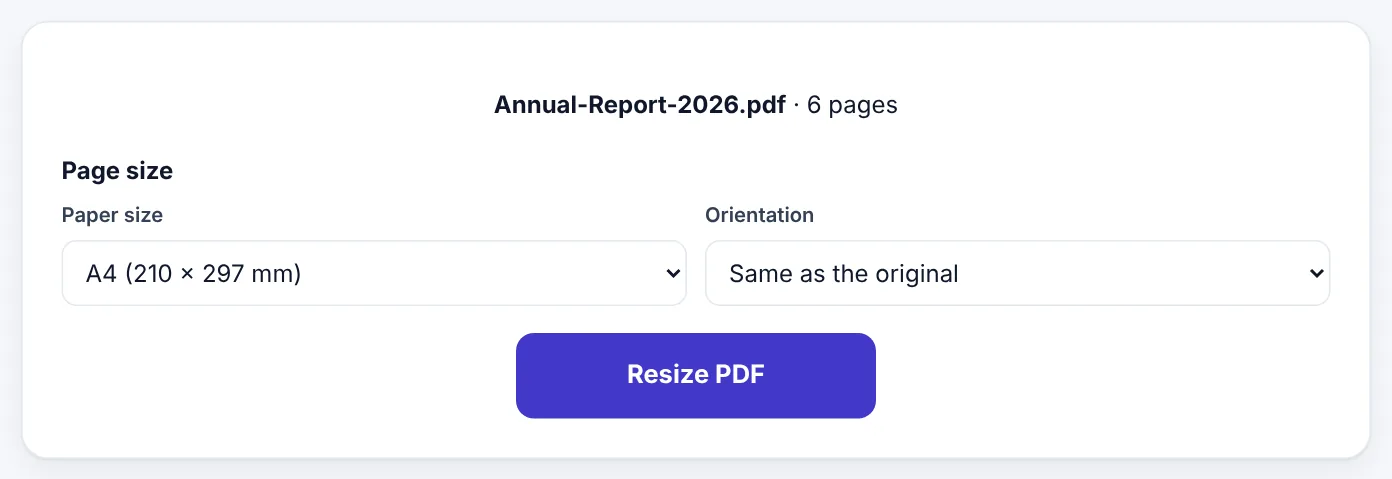
Each page's content is scaled to fit the new size while keeping its proportions, and centred on the page. Text stays real, sharp and searchable, and pictures keep their quality, because the content is scaled rather than re-drawn as an image.
Typical jobs
Making every page A4 for an application portal
Portals for visas, universities and government services often require A4. If your merged application contains a US Letter certificate, a scanned ID at an odd size and an A4 letter, resize the whole file to A4, Same as the original. Every page becomes A4 and the portal accepts it.
Sending a document to the USA or Canada
If an American client will print your A4 report, resize it to US Letter first. Nothing will be cut off on their printers, and the margins will look normal.
Unifying a merged document
Merged PDFs often contain pages of different sizes, which look untidy when scrolling and can confuse printers. Resize the merged file to one size so every page matches. See our guide on merging PDF files.
Making a poster or a booklet
Resize an A4 flyer to A3 for a poster-sized print, or a page to A5 for a small booklet. Because the A sizes share proportions, the layout scales perfectly.
Custom sizes
Some uses need exact sizes, such as book interiors (for example 6 × 9 inches, about 152 × 229 mm), labels, postcards or certificates. Choose Custom size and enter the width and height in millimetres.
Try Resize PDFFree, no sign-up, and your file never leaves your device.Open tool →

Resize, crop or add margins?
Changing size is not always the answer. Related tools solve related problems:
| Problem | Tool |
|---|---|
| Pages are the wrong paper size | Resize PDF |
| Pages have huge white margins or unwanted edges | Crop PDF |
| Content is too close to the edge to print | Resize to a slightly larger size, or reprint with "Fit to page" |
| You need extra blank pages, such as for notes | Add Blank Pages |
Crop PDF trims the visible area of pages: useful for removing scanner borders, black edges or wide white margins. You can crop all pages, only the page shown, or pages you choose.
Printing tips that avoid size problems
Even with the right page size, printer settings matter:
- "Actual size" or "100%" prints the page exactly as it is. Use this for forms, passport photos and anything that must be the correct physical size.
- "Fit" or "Shrink oversized pages" scales pages to fit the paper. Use it when a document is slightly bigger than your paper.
- Check the paper size setting in the print dialog. Many home printers in A4 countries are set to Letter by default, or the other way round, after a software update.
- Print one test page before printing a long document.
A short history of paper sizes
The A series comes from a German standard (DIN 476) introduced in 1922, based on a proposal by the physicist Georg Christoph Lichtenberg more than a century earlier. Its idea was elegant: a sheet whose sides are in the ratio 1 : √2 keeps the same shape when folded in half. Starting from A0, a sheet of one square metre, every size is half the previous one. It became the international standard ISO 216 and spread to almost every country.
US Letter's 8.5 × 11 inches has a more practical origin, often linked to the size of paper moulds and what a craftsman could handle. It became standard in the United States in the 20th century, and North America never switched to A4.
The result is the small mismatch we live with today: two "normal" paper sizes, about 6 mm different in width and 18 mm different in height.
Common sizes for specific jobs
| Job | Usual size |
|---|---|
| Office documents, letters, CVs (most countries) | A4 |
| Office documents (USA, Canada) | US Letter |
| US legal filings, some contracts | Legal |
| Posters for notice boards | A3 or A2 |
| Leaflets and small booklets | A5 |
| Paperback book interiors | Often 5 × 8 in, 5.5 × 8.5 in or 6 × 9 in |
| Postcards | Around A6 (105 × 148 mm) |
| Business cards | 85 × 55 mm (Europe) or 3.5 × 2 in (USA) |
For book printing services and specialised products, always use the exact size the printer specifies; enter it with Custom size.
Resizing vs scaling when printing
There are two ways to get a document onto a different paper size:
- Resize the PDF so the file itself has the new page size. Everyone who opens or prints it gets the right size. Best for sending files to other people, portals and print shops.
- Scale when printing using "Fit to page". Only that print job is affected; the file stays the same. Fine for printing at home.
If a document will be printed by others or uploaded, resizing the file removes any guesswork.
Mixed page sizes in one document
Documents assembled from different sources often contain several sizes: an A4 letter, a Letter-size form, a scanned receipt that is long and narrow. On screen this looks untidy; in print, some pages end up tiny and others cut off. Resizing the whole document to one size fixes both problems at once, and is usually the last step before sending a combined application.
Designing documents that work on both A4 and Letter
If you regularly send documents to people in both paper systems, you can design them so they print well on either size without resizing:
- Use generous margins. Margins of at least 20 mm (about 0.8 inches) on all sides keep content safe on both sizes, because the difference between A4 and Letter falls inside the margin.
- Keep important content away from the bottom. A4 is about 18 mm taller than Letter. Footers placed very low on an A4 page are the first thing to be cut off on Letter paper.
- Keep the width in mind. Letter is about 6 mm wider than A4. Wide tables designed for Letter can be slightly tight on A4.
- Check before exporting. In Word, Google Docs and most design programs, the page size is set in the page setup; change it there before exporting to PDF when you know the destination.
- Use "Fit" when printing someone else's file. If a document arrives in the other size and you only need a printed copy for yourself, printing with "Fit to page" is quick and good enough.
Checking the page size of a PDF
Not sure what size your PDF is? Most PDF viewers show it:
- Adobe Acrobat Reader: File → Properties → Page Size.
- Chrome and Edge: the size is not shown directly, but printing to "Save as PDF" lets you see the paper size used.
- Mac Preview: Tools → Show Inspector.
- Rule of thumb: a page that is noticeably taller and narrower than you expect is probably A4; a slightly wider, shorter page is probably Letter.
Mixed documents may contain several sizes; resizing to one size makes them consistent.
Paper sizes for photos and ID documents
Passport photos, ID cards and photo prints follow their own sizes, which is why "A4" or "Letter" settings sometimes produce the wrong result. A typical passport photo is 35 × 45 mm in Pakistan, the UK and Europe, and 2 × 2 inches in the USA. When printing a sheet of passport photos, print at Actual size, never "Fit", so each photo keeps its exact dimensions. The same applies to anything measured physically: labels, stickers, business cards and forms with boxes that must line up with pre-printed paper.
Frequently asked questions
Will resizing make my text blurry?
No. Text and vector graphics are scaled mathematically and stay sharp. Photos are scaled too, keeping their original resolution.
Will the content be stretched?
No. Proportions are kept. If the old and new sizes have different shapes (such as Letter to A4), the content fits within the new page and small margins appear on one side.
Can I resize only some pages?
Resize PDF changes all pages to the same size. To resize part of a document, split it with Split PDF, resize the part you need and merge the parts again.
Which size should I use for documents in Pakistan or India?
A4 is the standard for offices, universities, government forms and printing in both countries.
What size is a US visa or embassy document?
Requirements vary. US forms are usually Letter, but many embassies abroad accept A4. Check the specific instructions.
Can I make a PDF smaller in size (KB) by resizing pages?
Changing the paper size does not reduce the file size much, because the content stays the same. To make the file smaller, use Compress PDF.
Why does my printer add margins even at A4?
Most printers cannot print to the very edge of the paper. Content placed very close to the edge may be cut slightly. Leave margins of at least 5 mm in your design.
In short
Most of the world uses A4; North America uses Letter; the difference is small but causes cut-off edges, odd margins and rejected uploads. Resize every page to the size your printer, client or portal expects, keep proportions intact, use Custom size for books and labels, and print at "Actual size" whenever the physical size matters.
Tools used in this guide
 Crop PDF
 Add Blank Pages
 Merge PDF
Keep reading
 PDF GuidesHow to Change the Background Color of a PDF (Free, Online)
Change a white PDF to cream, mint, light blue or any colour in under a minute – on your phone or computer, without Adobe Acrobat and without uploading the file.
4 min read PDF GuidesWhat Does "Flatten a PDF" Mean, and When Should You Do It?
Flattening turns form fields, comments, stamps and signatures into a fixed part of the page. Learn when to flatten, the two ways to do it, and the mistakes to avoid before sending a filled form.
9 min read PDF GuidesHow to Crop a PDF and Remove White Margins
Trim wide white margins, scanner borders and unwanted edges from PDF pages, crop all pages or just one, and understand what cropping really hides. Includes reading on phones and printing tips.
9 min read